用js实现放大镜效果
实现放大镜效果的基本思路
放大镜效果通常用于电商网站展示商品细节。核心原理是通过监听鼠标移动事件,同步显示放大区域。需要两个关键元素:原图容器和放大镜容器。
HTML结构准备
创建基础HTML结构,包含原图容器和放大镜容器。原图需要准备一张高分辨率大图用于放大展示。

<div class="container">
  <div class="original-img">
    <img src="small-image.jpg" id="smallImg">
    <div class="lens"></div>
  </div>
  <div class="zoom-result"></div>
</div>
CSS样式设置
设置基础样式,确保放大镜镜片和结果区域定位准确。镜片需要绝对定位并隐藏,结果区域需要固定尺寸。
.container {
  position: relative;
}

.original-img {
  position: relative;
  width: 500px;
  height: 500px;
}

.lens {
  position: absolute;
  width: 100px;
  height: 100px;
  background-color: rgba(255, 255, 255, 0.3);
  border: 1px solid #ddd;
  cursor: none;
  display: none;
}

.zoom-result {
  position: absolute;
  width: 500px;
  height: 500px;
  left: 520px;
  top: 0;
  overflow: hidden;
  display: none;
  border: 1px solid #ddd;
}
JavaScript核心逻辑
实现鼠标移动时计算镜片位置,同步显示放大区域。需要计算比例关系并设置背景图位置。
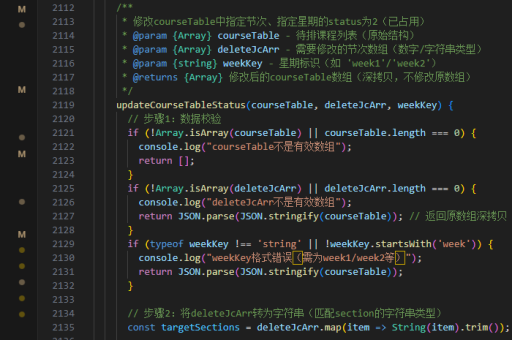
document.addEventListener('DOMContentLoaded', function() {
  const smallImg = document.getElementById('smallImg');
  const lens = document.querySelector('.lens');
  const zoomResult = document.querySelector('.zoom-result');
  const originalImg = document.querySelector('.original-img');

  // 预加载大图
  const largeImg = new Image();
  largeImg.src = 'large-image.jpg';

  // 计算放大比例
  const ratio = largeImg.width / smallImg.width;

  originalImg.addEventListener('mousemove', function(e) {
    // 显示镜片和结果区域
    lens.style.display = 'block';
    zoomResult.style.display = 'block';

    // 获取鼠标位置
    let x = e.clientX - originalImg.getBoundingClientRect().left;
    let y = e.clientY - originalImg.getBoundingClientRect().top;

    // 限制镜片不超出图片范围
    x = Math.max(0, Math.min(x - lens.offsetWidth/2, smallImg.width - lens.offsetWidth));
    y = Math.max(0, Math.min(y - lens.offsetHeight/2, smallImg.height - lens.offsetHeight));

    // 设置镜片位置
    lens.style.left = `${x}px`;
    lens.style.top = `${y}px`;

    // 设置放大区域背景图位置
    zoomResult.style.backgroundImage = `url(${largeImg.src})`;
    zoomResult.style.backgroundSize = `${smallImg.width * ratio}px ${smallImg.height * ratio}px`;
    zoomResult.style.backgroundPosition = `-${x * ratio}px -${y * ratio}px`;
  });

  originalImg.addEventListener('mouseout', function() {
    lens.style.display = 'none';
    zoomResult.style.display = 'none';
  });
});
性能优化建议
为提高用户体验,可以添加以下优化措施:
- 预加载大图确保放大时无延迟
- 添加过渡动画使镜片移动更平滑
- 限制mousemove事件触发频率避免性能问题
- 响应式设计适配不同屏幕尺寸
// 节流优化示例
let throttleTimer;
originalImg.addEventListener('mousemove', function(e) {
  clearTimeout(throttleTimer);
  throttleTimer = setTimeout(() => {
    // 原有逻辑
  }, 16); // 约60fps
});
兼容性处理
考虑不同浏览器和设备的兼容性问题:
- 添加触摸事件支持移动设备
- 为IE浏览器添加polyfill
- 检测图片加载状态避免未加载完成时出错
// 触摸事件支持
originalImg.addEventListener('touchmove', function(e) {
  e.preventDefault();
  const touch = e.touches[0];
  const mouseEvent = new MouseEvent('mousemove', {
    clientX: touch.clientX,
    clientY: touch.clientY
  });
  originalImg.dispatchEvent(mouseEvent);
});
通过以上步骤可以实现一个基础的放大镜效果,根据实际需求可以进一步扩展功能和完善细节。